
Example code
Check your API key
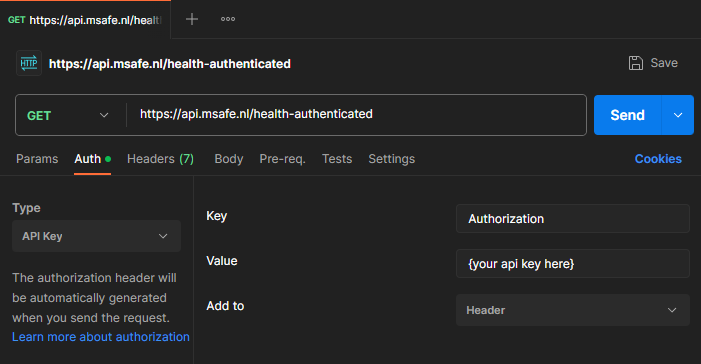
You can check if your API keys works by calling the authenticated health endpoint of the API. You can also use this endpoint to see if the mSafe API is healthy. Below are 3 examples of how to do this.
Python
import requests

url = "https://api.msafe.nl/health-authenticated"

payload = {}
headers = { 'Authorization': '{your_api_key_here}' }

response = requests.request("GET", url, headers=headers, data=payload)

print(response.text)
curl
curl https://api.msafe.nl/healthcurl -H 'Authorization: {your_api_key_here}' https://api.msafe.nl/health-authenticated
Postman
Upload Files
Uploading files to mSafe works in three steps.
- Request a SAS URI from mSafe
- Upload your file to the SAS URI
- Share the file in mSafe
Using AzCopy
azcopy cp "{path to file}" "{SAS URI}"Using C#
using Azure.Storage.Blobs;

Uri sasUri = new("{SAS URI}");
BlobClient blobClient = new(sasUri);
await using var fileStream = File.OpenRead(@"{path to file}");
await blobClient.UploadAsync(fileStream);